


导入
TestNG 默认报告与自定义报告器
在本节课中,你将了解 TestNG 报告。
TestNG 默认报告列表
TestNG 默认会生成一些基本的测试运行报告。以下是部分报告类型:
org.testng.reporters.SuiteHTMLReporter—— 为测试套件生成 HTML 格式的报告。org.testng.reporters.FailedReporter—— 生成包含所有失败测试的 testng-failed.xml 文件。org.testng.reporters.XMLReporter—— 以 XML 格式生成测试输出的汇总报告。org.testng.reporters.EmailableReporter2—— 生成单页 HTML 报告 emailable-report.html,便于邮件发送。org.testng.reporters.JUnitReportReporter—— 为每个测试套件生成符合 JUnit 格式的 XML 测试输出文件。
自定义报告器
可以通过实现 org.testng.IReporter 接口来自定义报告器。
以下是一个生成测试运行摘要报告的 IReporter 实现示例:
1package com.example;
2
3import java.io.File;
4import java.io.FileWriter;
5import java.io.IOException;
6import java.io.Writer;
7import java.text.DecimalFormat;
8import java.util.List;
9
10import org.testng.IReporter;
11import org.testng.ISuite;
12import org.testng.ITestContext;
13import org.testng.xml.XmlSuite;
14
15public class SummaryReport implements IReporter {
16
17    private DecimalFormat decimalFormat = new DecimalFormat("00.##");
18
19    @Override
20    public void generateReport(List<XmlSuite> xmlSuites, List<ISuite> suites, String outputDirectory) {
21
22        File file = new File(outputDirectory, "summary.html");
23        try (Writer writer = new FileWriter(file)) {
24            writer.write("<html><body>");
25            String title = "<table border='1' style='background-color:yellow;border:1px dotted black;width:80%;border-collapse:collapse;'><caption style='margin: 1em; font-weight: bolder'>测试执行摘要报告</caption><tbody>";
26            writer.write(title);
27            writer.write(
28                    "<tr><th style='padding:3px;' align='center'>套件名称</th><th style='padding:3px;' align='center'>总数</th><th style='padding:3px;' align='center'>通过</th><th style='padding:3px;' align='center'>失败</th><th style='padding:3px;' align='center'>跳过</th><th style='padding:3px;' align='center'>通过率</th><th style='padding:3px;' align='center'>总执行时间(秒)</th></tr>");
29
30            for (ISuite suite : suites) {
31                suite.getResults().forEach((k, v) -> {
32                    ITestContext context = v.getTestContext();
33                    Integer passed = context.getPassedTests().size();
34                    Integer failed = context.getFailedTests().size();
35                    Integer skipped = context.getSkippedTests().size();
36                    Integer total = passed + failed + skipped;
37                    Double execTime = (context.getEndDate().getTime() - context.getStartDate().getTime()) * 0.001;
38
39                    if (total > 0) {
40                        try {
41                            String percent = decimalFormat.format((passed.doubleValue() / total.doubleValue()) * 100.0D);
42                            writer.write(String.format(
43                                    "<tr><td style='text-align: center'>%s</td><td style='text-align: center'>%s</td><td style='text-align: center'>%s</td><td style='text-align: center'>%s</td><td style='text-align: center'>%s</td><td style='text-align: center'>%s</td><td style='text-align: center'>%s</td></tr>",
44                                    suite.getName(), total, passed, failed, skipped, percent,
45                                    decimalFormat.format(execTime)));
46                        } catch (IOException e) {
47                            e.printStackTrace();
48                        }
49                    }
50                });
51            }
52            writer.write("</tbody></table></body></html>");
53        } catch (IOException ex) {
54            ex.printStackTrace();
55        }
56        System.out.println("正在将摘要报告写入 " + file.getAbsolutePath());
57    }
58}
该自定义 IReporter 实现需要在 testng.xml 中注册,如下所示:
1<listeners>
2    <listener class-name="com.example.SummaryReportListener" />
3</listeners>
或在测试类中使用注解方式添加:
1@Listeners({ com.example.SummaryReport.class })
2public class TestClass {}
添加监听器的相关内容已在 TestNG 监听器一课中详细讲解。
默认的测试输出目录为 ${user.dir}/test-output。
自定义报告器会生成如下格式的 HTML 报告 summary.html:

以下是 emailable-report.html 的示例:
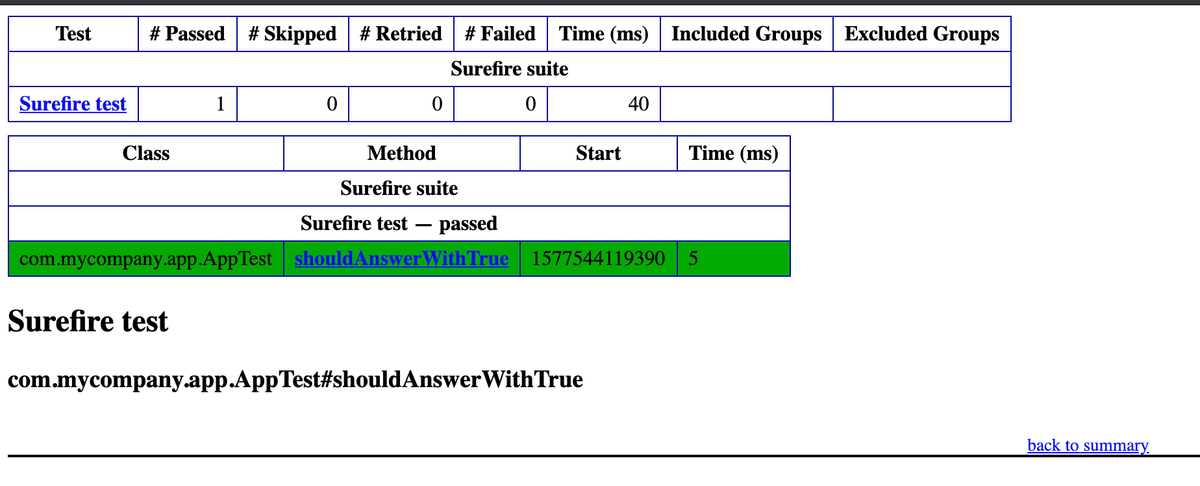
emailable-report.png
本节课我们学习了 TestNG 中的报告功能。在下一节课中,你将学习如何集成 Allure 报告框架。