


导入
安装包
学习如何在本地机器上安装包。
安装 JAX
可以通过 Python 包索引(PIP)安装 JAX,命令如下:
安装 jax 框架
1pip install jax
JAX 已预装在 Google Colaboratory 中。
在 Google Colaboratory 上配置 TPU
你需要进行设置,才能在 Colab 中使用 JAX 调用 TPU。请运行以下代码完成配置。请确保已通过“运行时” -> “更改运行时类型”将运行时类型切换为 TPU。如果没有可用的加速器,JAX 将回退到使用 CPU。
在 Google Colaboratory 上配置 TPU
1import jax.tools.colab_tpu
2jax.tools.colab_tpu.setup_tpu()
3jax.devices()
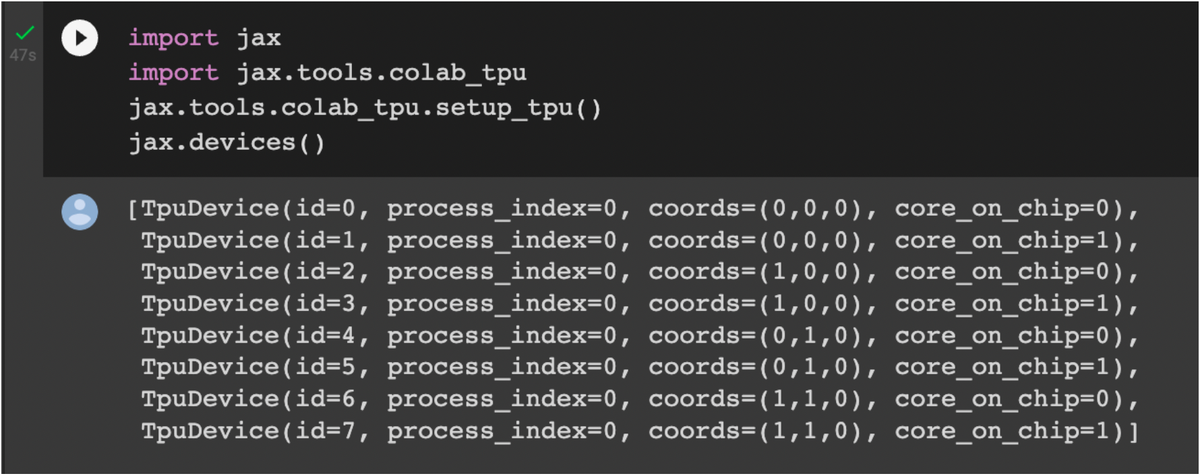
Screenshot 2022-10-11 at 11.41.02 AM.png
安装 Flax
我们安装 flax 来构建神经网络。在你的 Notebook 中使用时,请运行以下命令:
安装 flax 库
1pip install flax
安装 flaxmodels 包
1pip install flaxmodels
安装 TensorBoard
要从 PIP 安装 TensorBoard,请在你的 Google Colaboratory 或 Jupyter Notebook 中运行以下命令:
在 Notebook 中安装 TensorBoard
1pip install tensorboard
安装 TensorBoard 插件 profile
第一步是安装性能分析插件,请在你的 Google Colaboratory 或 Jupyter Notebook 中运行以下命令:
安装 tensorboard-plugin-profile
1pip install -U tensorboard-plugin-profile
安装 jax-resnet 库
1pip install jax-resnet